20.3 Rattle Startup
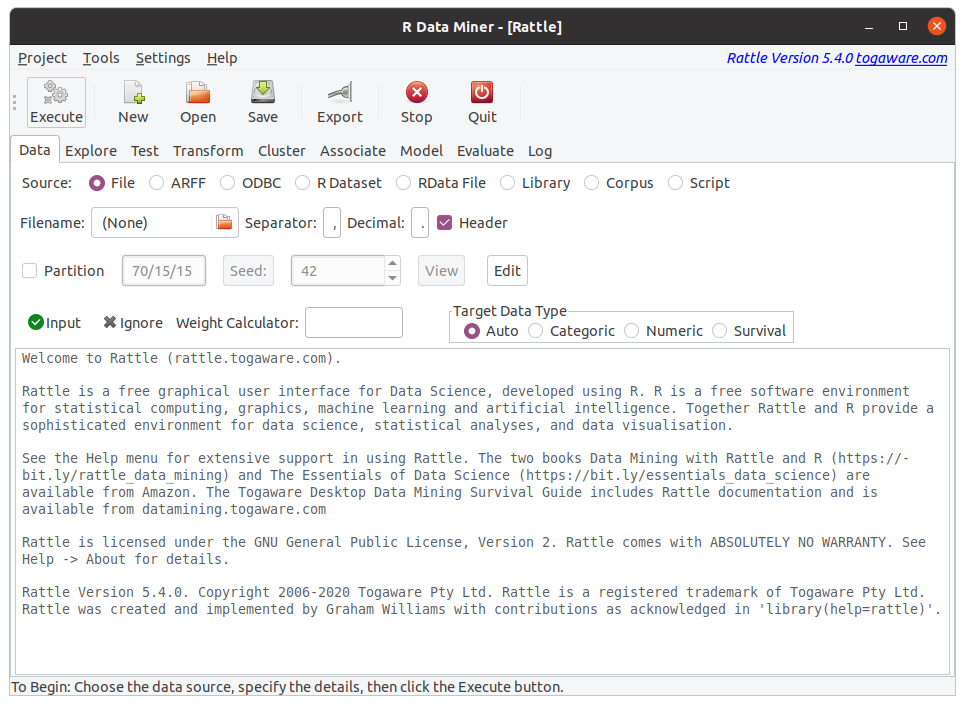
After starting R (perhaps via RStudio) we can start up (G. Williams 2026), a graphical user interface for the data scientist, from the R Console prompt. Simply load the package then invoke the rattle::rattle() command, as in:
The above Rattle window will display, ready to load data, explore and test the data, transform the data, and then begin building models from the data.
The interface aims to be simple and easy to use. The row of buttons support the basic operations, particularly the Execute button which we click so that the particular tab setting take effect or its associated operation is performed. Below the buttons are a series of tabs that represent the major steps of a data science project. In general we work through the tabs from the left to right, loading some data, exploring and testing the data, performing some transformations on the data, doing a cluster and/or association analysis, building a predictive model, and evaluating the performance of the model.
After setting up the requirements and settings for a particular tab, be sure to click the Execute button to have the settings within tab take effect, or else perform the task associated with the tab.
References
If you find this curated material useful then you can consider a donation to support it's ongoing availability and give you access to the PDF version of this book. The material has been scoped up by Generative AI without permission or any kind of recompense so do consider a donation if you can afford it. Unlike Generative AI your access to this materials is freely given. Desktop Survival Guides include Data Science, GNU/Linux, and MLHub. Books available on Amazon include Data Mining with Rattle and Essentials of Data Science. Togaware has a 30 year tradition of making popular open source software which includes sold privacy preserving productivity apps, rattle, wajig, and mlhub. Hosted by Togaware, a pioneer of free and open source software since 1984. Copyright © 1995-2022 Graham.Williams@togaware.com Creative Commons Attribution-ShareAlike 4.0